Survivors,
The new Camp Production feature is now available!
By assigning Heroes to production buildings in your Camp, you can make use of their unique Production Skills to improve building attributes such as production output, maximum maintenance limits, and storage capacity.
This gives Heroes another way to contribute to your settlement beyond combat and introduces a new progression path for developing your roster.
An in-game tutorial is also available in multiple languages to make the feature easier to understand for players across different regions.
I. What is Camp Production?
When you assign a Hero to a production building, their Production Skill provides bonuses to that building.
Depending on the Hero and Skill, these bonuses may improve:
- Production output
- Maximum maintenance limits
- Storage capacity
Heroes who may not normally be part of your combat lineup can also provide value through Camp Production.
II. How to Use Production Dispatch
You can assign a Hero in four steps:
1. Upgrade the Building
Raise the building to the required level to unlock its Production Dispatch slot. Different buildings have different unlock requirements.
2. Open Production Dispatch
Enter your Camp, select the building you want to assign a Hero to, and tap the Production Dispatch button.
3. Select a Hero
Choose a Hero who has an unlocked Production Skill compatible with that building.
Heroes with more Production Skills and higher Skill levels will appear higher in the selection list.
Heroes who are already assigned to another building will be grayed out and cannot be selected again.
4. Confirm the Assignment
Tap OK and the Hero's Production Skill will take effect immediately.
Changing an Assigned Hero
You can replace an assigned Hero at any time.
Open the building details and select Change Hero in the upper-right corner of the Hero portrait to choose a replacement.
If the new Hero has a Skill that boosts resource production, resources already generated by the building will be settled before the new bonus takes effect, so you won't lose existing production when switching Heroes.
III. Which Buildings Support Production Dispatch?
Farm
- Production: Supplies
- Production Dispatch unlocks at Farm Level 12
- Bonus attributes: Yield / Maximum Sustain Quantity
Material Warehouse
- Production Dispatch unlocks at Level 12
- Bonus attribute: Storage Capacity
Tent
- Produces: Survival Points
- Production Dispatch unlocks at Tent Level 11
- Bonus attributes: Production / Maximum Maintenance Capacity
Armory
- Produces: Ordnance Crates
- Production Dispatch unlocks at Armory Level 1
- Bonus attributes: Production Output / Maximum Maintenance Quantity / Storage Capacity
Tip: A global bonus, shown in yellow, applies to all buildings of the same type in your Camp. A single-building bonus, shown in green, applies only to the individual building where the Hero is assigned.
IV. Skill Development and Consumption
There are several types of Production Skills with different bonuses.
Using Hershel as an example:
Walker Compost Master
The first general Production Skill.
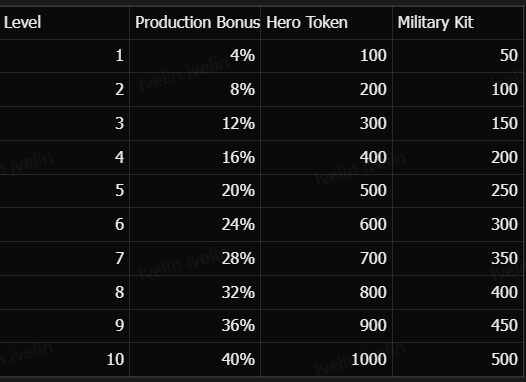
Anti-Walker Cellar
The second general Production Skill.
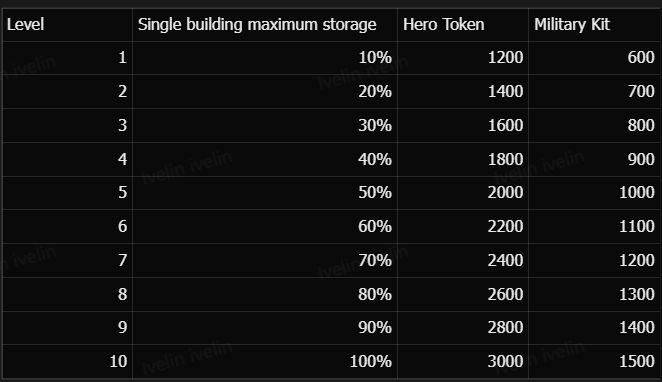
Wasteland Hardcore Planter
The third exclusive Production Skill.
This Skill takes effect on all Farms.
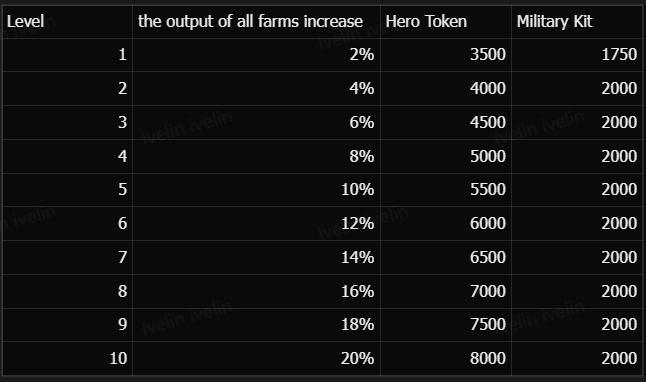
The tables show how each Skill develops across its levels, together with the corresponding Hero Token and Military Kit costs.
V. Tips
- Production Skills become available when your Council reaches Level 21.
- Assigning Heroes to buildings does not affect your deployed combat lineup.
- Each Hero can only be assigned to one building at a time.
- Each production building has one Hero assignment slot.
- To provide bonuses to multiple buildings, you will need to develop and assign multiple Heroes.
- The system will remind you when eligible buildings have empty assignment slots.
- Heroes with more Production Skills and higher Skill levels appear higher in the selection list. Prioritizing these Heroes can help you maximize the bonuses received by a building.
We hope this FAQ helps you get started with Camp Production and make the most of your Heroes!
The Team
.png)
.png)